What Is an AI Gateway? The AI Control Plane, Explained (2026)
An AI gateway is software that centralizes your company's AI usage behind one endpoint. Here's what it does, why nobody agrees on its name, and how self-hosted and cloud AI gateways differ.
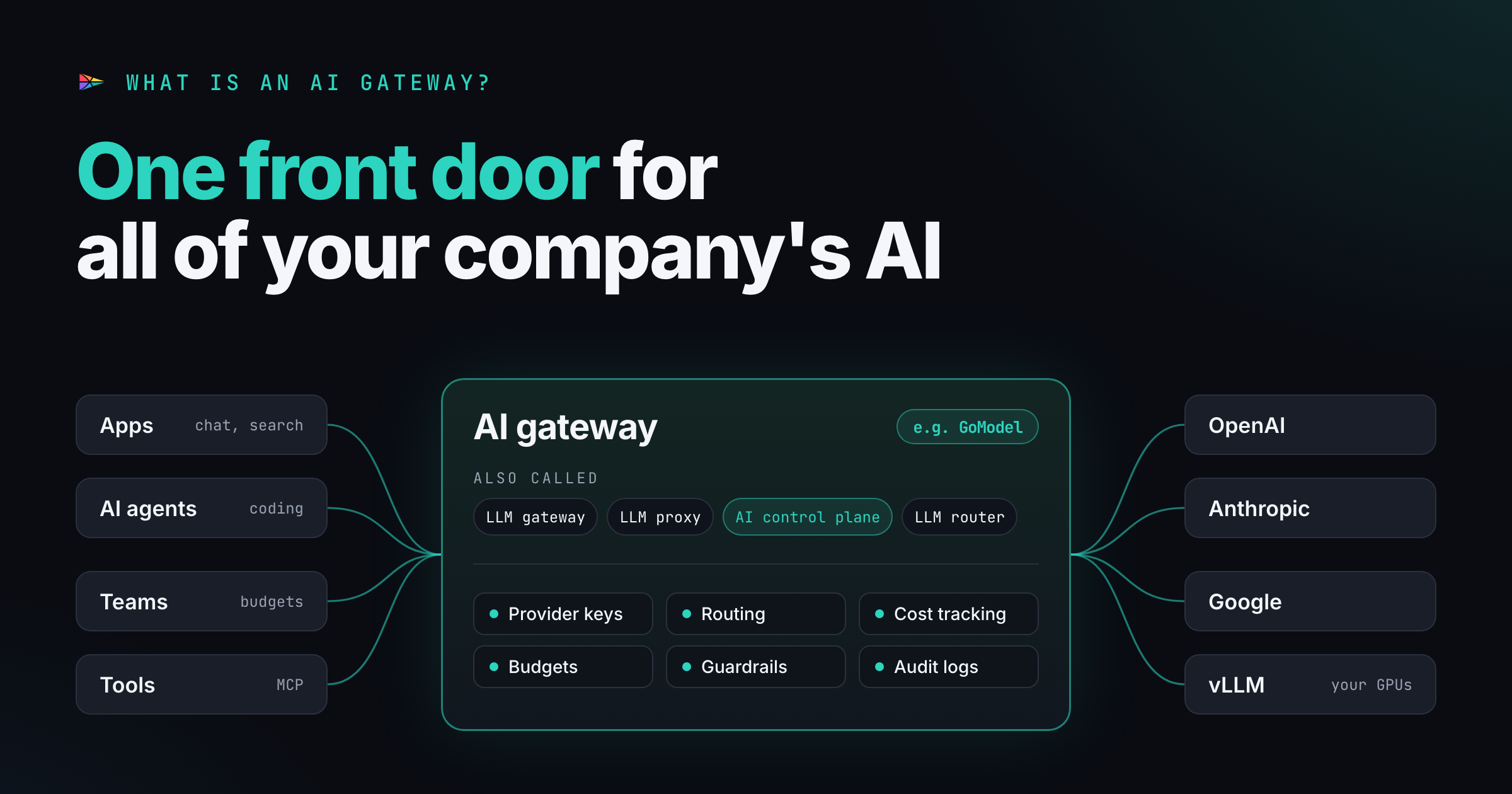
TL;DR: An AI gateway is a piece of software that centralizes your company’s AI usage. Every app, agent and employee sends model requests to one endpoint, and that one place handles provider keys, routing, costs, budgets, guardrails and logs. The industry hasn’t settled on a name: you’ll see AI gateway, LLM gateway, LLM proxy and, more and more, AI control plane. There are two main types. Self-hosted gateways (usually open source) run in your own network; cloud gateways run on a vendor’s infrastructure. The big difference is where your prompts go first, and who can read them there.
A year ago most companies had a simple AI setup: one team, one OpenAI key, one bill. Now the same company has a support bot on Anthropic, a coding agent on three providers, a data team testing open-weight models on its own GPUs, and a dozen employees who pasted an API key into some desktop tool. Nobody can answer basic questions: how much did we spend last week, which team spent it, and did anyone send customer data to a model we haven’t approved?
That’s the problem an AI gateway solves.
What is an AI gateway?
An AI gateway is a piece of software that sits between everything in your company that uses AI and every AI provider you use. Instead of each application calling OpenAI, Anthropic, Google or a self-hosted vLLM server directly, they all call the gateway, and the gateway forwards the request.
That sounds like a plain reverse proxy, and at the network level it is one. What makes it useful is that it understands AI traffic. It knows which model was asked for, how many tokens went in and out, what the request cost, and what the prompt and response contained. Because every request passes through one place, that place becomes the natural spot to centralize AI usage:
- One API for many providers. Apps speak one format (usually the OpenAI-compatible API) and the gateway translates for each provider. Switching models becomes a config change, not a code change.
- One place for provider keys. Real provider keys live in the gateway. Teams and apps get their own gateway keys, which you can scope, rotate and revoke without touching the provider account.
- Cost tracking, budgets and rate limits per user, team, app or key.
- Guardrails: PII redaction, prompt-injection checks, content moderation and system-prompt policies, enforced on every request.
- Reliability: retries, failover to a backup provider, load balancing and caching.
- Observability and audit: who called which model, when, with what, and what it cost.
- Access to tools. Newer gateways also put MCP servers behind the same authentication, so agents reach tools through the same front door as models.
Gartner, which published its first Market Guide for AI Gateways in October 2025, describes it the same way: an intermediary between applications and AI services that provides a central control plane to secure, govern and observe AI workloads. The same guide predicts that by 2028, 70% of software engineering teams building multimodel applications will use an AI gateway, up from 25% in 2025.
There’s no single name for it
If you search for this kind of software, you’ll find it under at least half a dozen names. They mostly describe the same thing, each one emphasizing a different part of the job:
| Term | Who tends to use it | What it emphasizes |
|---|---|---|
| AI gateway | Gartner, API management vendors, most products | The broad category: models, tools, policies |
| LLM gateway | Developer tools and open-source projects | Text-model traffic specifically |
| LLM proxy | Developers, early open-source projects | The network role: forwarding requests |
| AI control plane | Security and platform vendors, enterprise architects | Governance: policies, access, audit, approvals |
| LLM router / model router | Routing-focused products and marketplaces | Choosing the best or cheapest model per request |
| AI firewall | Security vendors | Blocking prompt injection and data leaks |
| MCP gateway / agent gateway | Agent platforms | Tool calls and agent-to-agent traffic, not just models |
AI control plane is the newest of these and deserves a short explanation. The term comes from networking, where the data plane moves traffic and the control plane decides how traffic should be moved. Applied to AI, the data plane is the stream of prompts and responses, and the control plane is the configuration around it: which models exist, who may use them, budgets, policies and audit records. As AI agents started deploying code, paying invoices and touching production databases on their own, vendors began selling the governance side as a product in its own right, and “AI control plane” became the name for it.
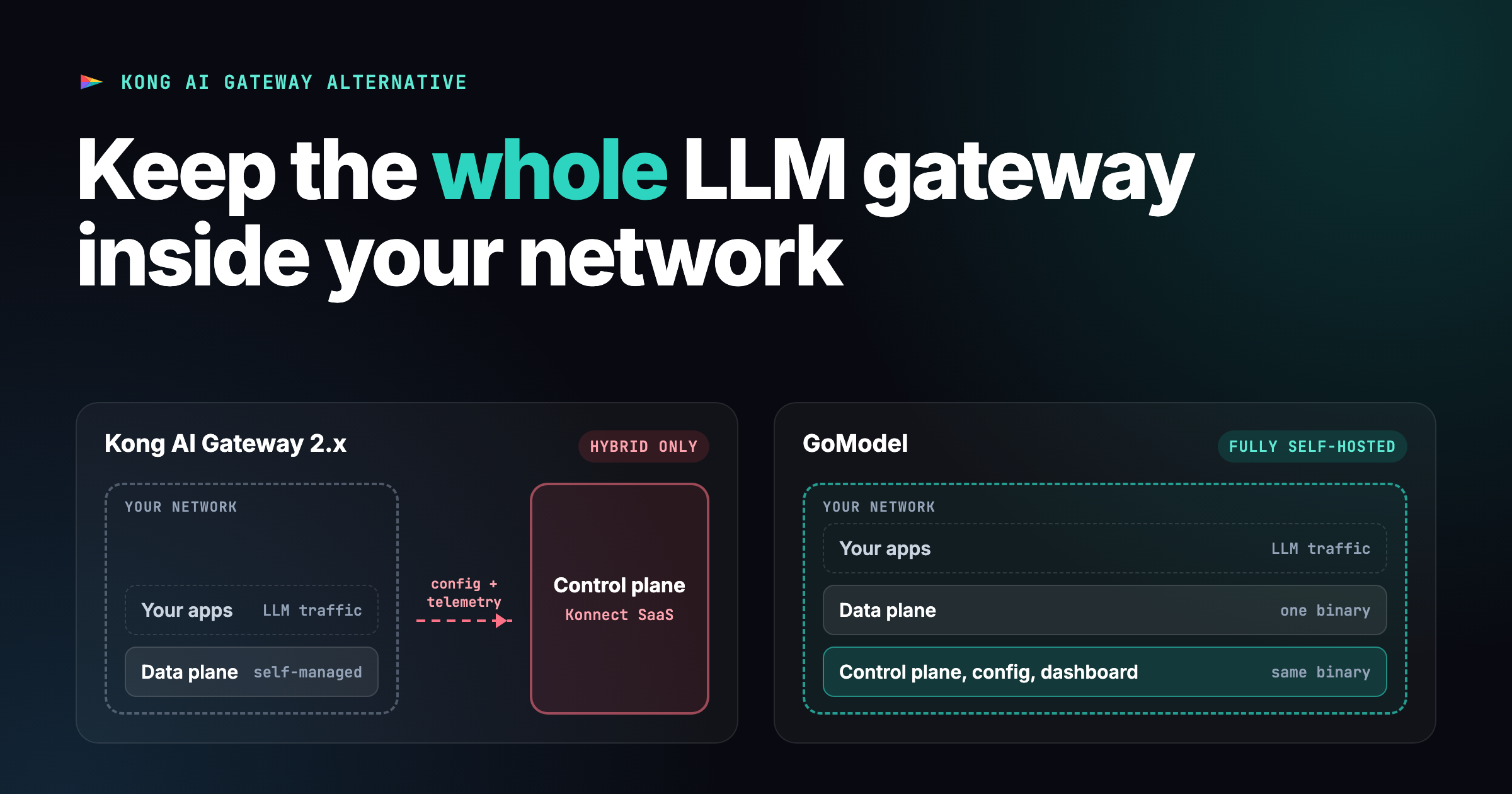
In practice the line is blurry. Most AI gateways contain both planes, and when someone sells you an “AI control plane” there is almost always a gateway underneath that enforces its decisions. Where the two planes run matters a lot, though, and we’ll come back to it below. (It’s also the main point of our Kong AI Gateway alternative post: Kong runs your data plane but keeps the control plane in its own cloud.)
So when you compare products, don’t rely on the label. Ask what the software actually does with each request, and where it runs.
An example: GoModel
We build GoModel, an open-source AI gateway written in Go, so it’s the easiest example for us to show. It runs as a single binary or container and includes its own admin dashboard, so the data plane and the control plane both run wherever you start it.
docker run --rm -p 8080:8080 \
  -e OPENAI_API_KEY="your-openai-key" \
  -e ANTHROPIC_API_KEY="your-anthropic-key" \
  enterpilot/gomodel
Your applications keep using the official SDKs. The only change is the base URL:
from openai import OpenAI

client = OpenAI(
    base_url="http://localhost:8080/v1",
    api_key="your-gomodel-key",
)

# Same client, two different providers behind the gateway
client.chat.completions.create(model="gpt-5-chat-latest", messages=[...])
client.chat.completions.create(model="claude-sonnet-5-5", messages=[...])
Anthropic’s SDK works the same way, through GoModel’s Anthropic-compatible
/v1/messages endpoint. From that point, every request from every app shows
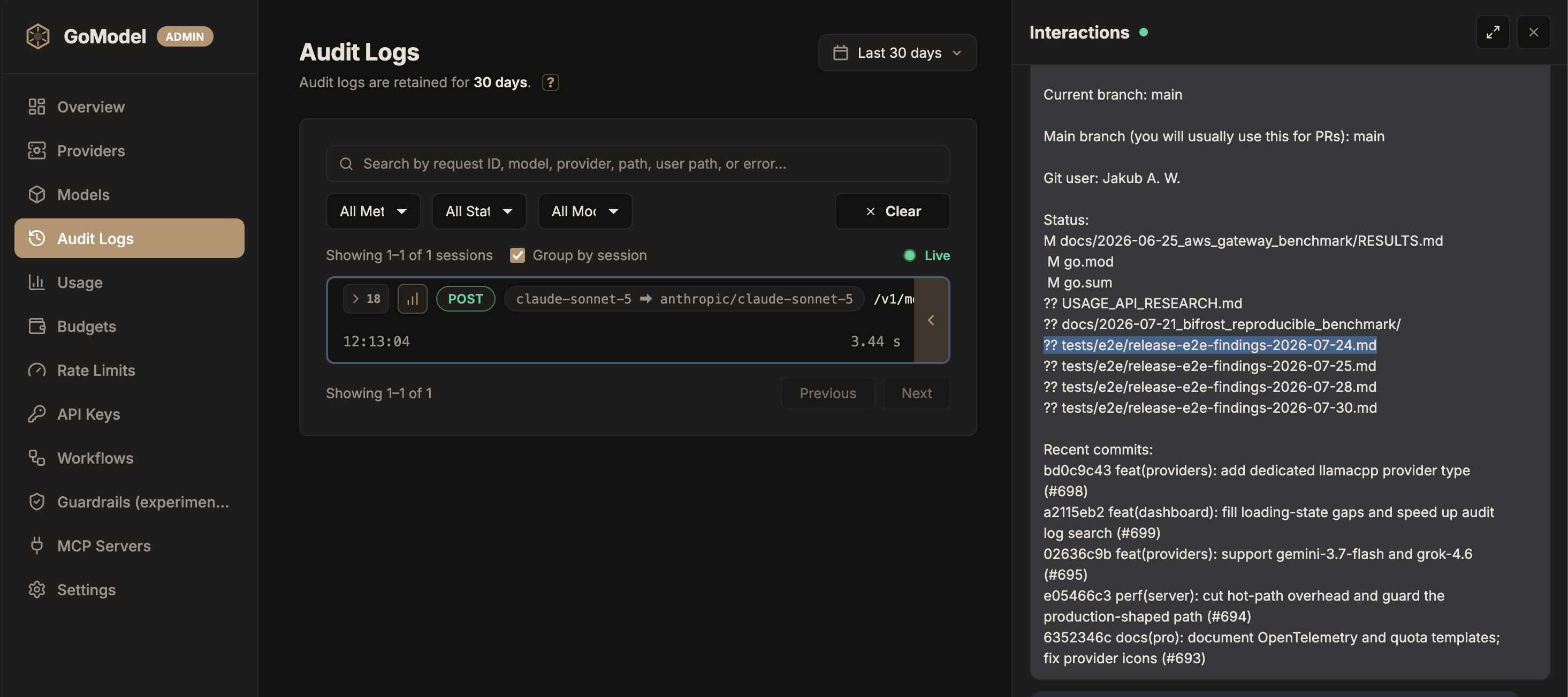
up in one place. Open http://localhost:8080/admin/dashboard and you can see
spending per model, user and team, set
budgets
and rate limits,
and read the audit log.
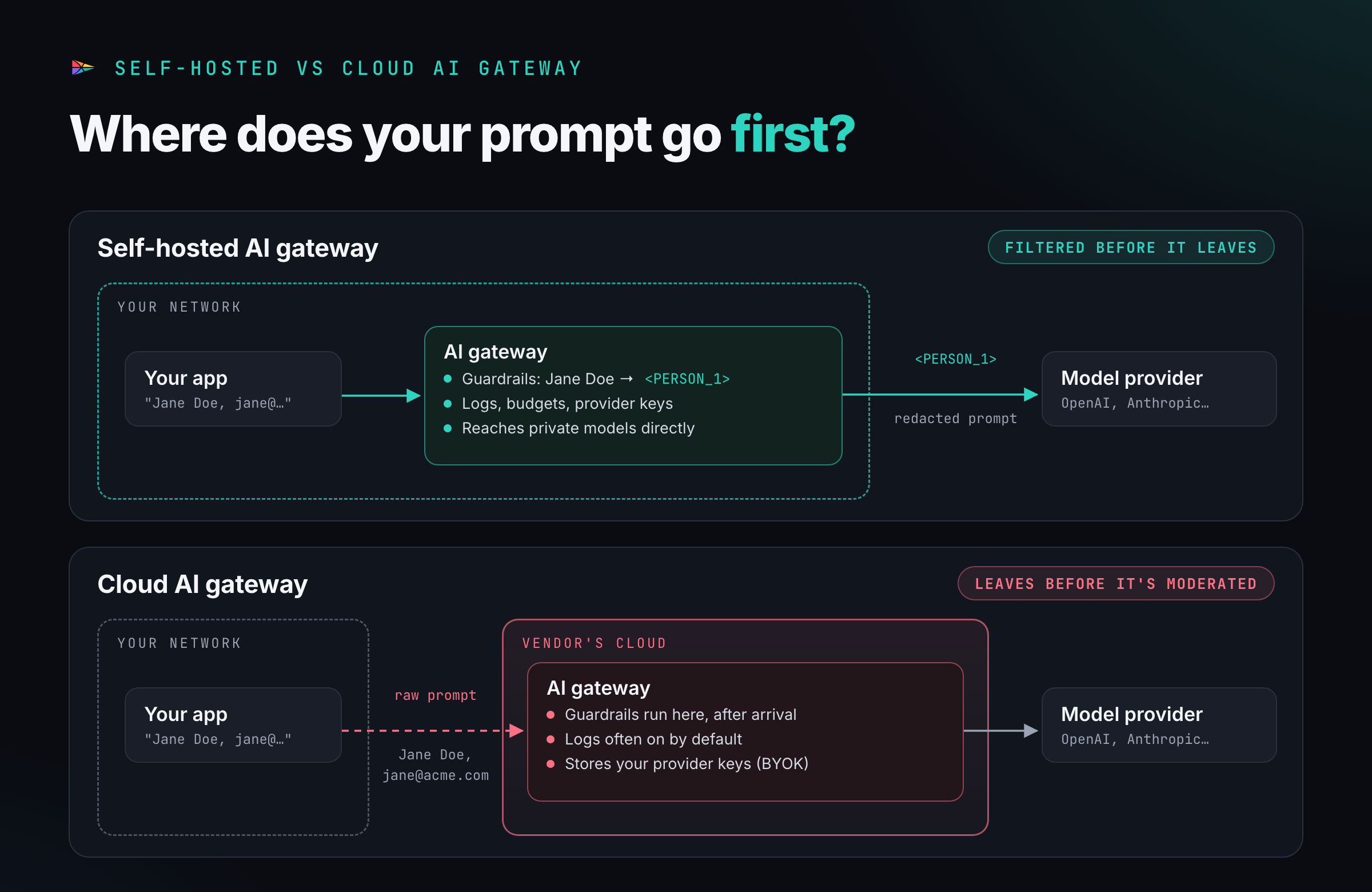
Here’s the kind of thing that only works when the gateway runs on your side. This guardrail replaces names, emails and phone numbers with placeholders before the prompt leaves your network, blocks credit card numbers outright, and puts the real values back into the response:
guardrails:
  enabled: true
  rules:
    - name: "pii-in"
      type: "presidio"
      order: 1
      config:
        entities: ["PERSON", "EMAIL_ADDRESS", "PHONE_NUMBER"]
        block_entities: ["CREDIT_CARD"]
        restore: true
    - name: "pii-out"
      type: "presidio"
      phase: "response"
      order: 1
      config:
        entities: ["PERSON", "EMAIL_ADDRESS", "PHONE_NUMBER"]
        restore: true
The user sees their own data in the answer. The model provider only ever sees
<PERSON_1>. That brings us to the main choice you’ll make when you pick an
AI gateway.
The two types of AI gateways
Every AI gateway falls into one of two groups, based on where it runs.
Self-hosted AI gateways
A self-hosted gateway runs on infrastructure you control: a server, a Kubernetes cluster, a VM in your cloud account, or an air-gapped machine. Most of them are open source or open core. GoModel, LiteLLM, Bifrost, Envoy AI Gateway and the open-source Portkey gateway are all in this group.
Pros
- Your data stays in your network until you decide otherwise. Guardrails, PII redaction and logging run on your side, before a prompt leaves. If you send traffic only to a self-hosted model, it never leaves at all.
- No extra party to trust. There’s no new sub-processor in your data processing agreements and no vendor that stores your prompts, logs or provider keys.
- Works with private and air-gapped models. A gateway inside your network can reach vLLM, SGLang or Ollama on internal hosts without exposing them to the internet.
- No per-request fees or markup. You pay the providers and your own infrastructure, nothing more.
- You can read, audit and fork the code. If the vendor changes direction, you still have the software.
- Lower latency is possible. A gateway next to your applications adds a local hop rather than a trip to someone else’s data center.
Cons
- You run it. Upgrades, high availability, databases for logs and usage, backups and monitoring are your job.
- Security patching is your job too. An AI gateway holds the keys to every provider you use, which makes it a valuable target. On March 24, 2026, attackers published two malicious LiteLLM versions (1.82.7 and 1.82.8) to PyPI. For a few hours, anyone who installed them ran a credential stealer that collected cloud credentials, SSH keys and environment variables, including API keys. Pin versions, verify images and keep the gateway’s dependencies small.
- Open-source projects can stall. Palo Alto Networks closed its
acquisition of Portkey on May 29, 2026. The open-source
Portkey-AI/gatewayrepository hasn’t had a commit since May 25. Check how actively a project is maintained, and who funds it, before you build on it. - Global scale takes work. If you serve users on several continents, you have to deploy the gateway in several regions yourself.
Cloud AI gateways
A cloud gateway runs on the vendor’s infrastructure. You get an endpoint URL, point your applications at it, and the vendor handles the rest. Cloudflare AI Gateway, Vercel AI Gateway, OpenRouter and Portkey’s hosted product all work this way. Kong AI Gateway 2.x is a hybrid: you run the data plane, but the control plane lives in Kong’s Konnect SaaS.
Pros
- Running in minutes. No servers, no database, no upgrades.
- Someone else is on call. Scaling, uptime and patching are the vendor’s problem.
- Global edge networks. Vendors like Cloudflare and Vercel run close to users around the world.
- One bill for many providers. Marketplaces like OpenRouter and Vercel sell credits that work across hundreds of models, so you don’t need an account with every provider.
- Extras you’d otherwise build, such as hosted dashboards, model catalogs and managed evaluation tools.
Cons
- You’re trusting another company’s infrastructure. Every prompt and response now passes through a third party, on top of the model provider. That’s one more sub-processor for your legal team, one more data residency question, and one more company whose security you depend on.
- Your data leaves before it’s moderated. This is the one people miss. With a cloud gateway, the raw prompt (customer names, contract text, source code) reaches the vendor’s servers before any guardrail runs, because the guardrails run there. Cloudflare’s AI Gateway guardrails, for example, evaluate prompts with Llama Guard running on Cloudflare’s Workers AI. That’s a sensible design, but it means “redact PII before it leaves our network” is impossible with a cloud gateway. By the time it’s redacted, it has left.
- Logging is often on by default. Cloudflare’s docs state that logs, including request and response data, are enabled by default for each gateway. You can turn them off, but you have to know to do it. Zero data retention promises also vary in the details: OpenRouter, for instance, doesn’t count in-memory prompt caching as retention.
- Your provider keys live with the vendor if you bring your own key.
- Shared fate. When the vendor has an outage, your AI features go down with it. On November 18, 2025, a bad configuration file took down large parts of Cloudflare’s network for several hours.
- Fees can grow with usage. OpenRouter charges 5.5% on credit purchases and 5% on bring-your-own-key requests after the first million each month. Vercel charges no token markup but bills $0.10 per 1,000 requests to enforce zero data retention team-wide. None of this is unreasonable, but it scales with your traffic.
- Private models are harder to reach. A gateway on the internet can’t call a model on your internal network unless you expose it.
Self-hosted vs cloud at a glance
| Self-hosted AI gateway | Cloud AI gateway | |
|---|---|---|
| Where it runs | Your servers, cloud account or air-gapped network | The vendor’s infrastructure |
| Where guardrails run | Inside your network, before data leaves | On the vendor’s side, after data arrives |
| Who sees your prompts | You and the model provider | You, the gateway vendor and the model provider |
| Provider keys | Stay with you | Stored by the vendor (with BYOK) |
| Setup | Minutes to hours, then ongoing operations | Minutes, no operations |
| Patching and uptime | Your responsibility | The vendor’s responsibility |
| Cost | Infrastructure only | Platform fees, per-request fees or markup |
| Private and local models | Direct access | Must be exposed to the internet |
| Air-gapped use | Possible | Not possible |
| Examples | GoModel, LiteLLM, Bifrost, Envoy AI Gateway | Cloudflare AI Gateway, Vercel AI Gateway, OpenRouter |
Which type should you choose?
A cloud AI gateway is a good fit if you’re a small team, you work on public or low-sensitivity data, your users are spread around the world, and you’d rather pay a fee than run another service. It’s also a quick way to try many models before you commit to any of them.
A self-hosted AI gateway is a good fit if you handle personal, financial, medical or proprietary data, you operate under GDPR, HIPAA or sector regulation, your security team wants to know exactly where prompts go, you run models on your own hardware, or AI spend is large enough that percentage-based fees add up.
A few questions settle it quickly for most teams:
- Is the data in our prompts allowed to reach a third party before we’ve filtered it?
- Does our security team accept a new sub-processor for AI traffic?
- Do we need to call models inside our own network?
- Who will patch the gateway, and how fast?
If the answers to the first two are “no”, you need a self-hosted gateway, and
the choice is about which one. We think GoModel is a good start: it’s
MIT-licensed, it’s one of the lightest gateways in our
AI gateway benchmark,
and with GOMODEL_OFFLINE=true it only talks to the providers you configure.
FAQ
What is an AI gateway in simple terms? It’s software that sits between your applications and AI providers like OpenAI or Anthropic. Every AI request goes through it, so you can manage keys, costs, access, guardrails and logs in one place instead of in every app.
Is an AI gateway the same as an AI control plane? Mostly, yes. “AI control plane” emphasizes the governance side: policies, access rules, budgets and audit. “AI gateway” emphasizes the traffic side. Most products do both, and vendors use the terms interchangeably.
What’s the difference between an AI gateway and an LLM gateway? An LLM gateway handles traffic to large language models. An AI gateway is the broader term and may also cover image, audio and embedding models, MCP tools and agent traffic. In everyday use the two names mean the same thing.
Do I need an AI gateway? If one application calls one provider, probably not. Once you have several applications, several providers, or several teams sharing AI spend, a gateway is the simplest way to see and control what’s happening.
Is a self-hosted AI gateway more secure than a cloud one? It keeps your data in fewer hands and lets you filter prompts before they leave your network. But it’s only as secure as you run it, so you’re responsible for patching, access control and verifying what you install.
Is GoModel free? Yes. The GoModel core is open source under the MIT license. GoModel Pro adds licensed extensions such as prompt compression, intelligent routing and single sign-on, and it’s self-hosted too.
To try GoModel, start with the quickstart, or ask us anything on Discord.